










Master the Basic Computer Course & Unlock Your Career
Take advantage of our short and long-term online digital marketing courses, which provide 100% placement rates.
There are 3-7 month options with guaranteed paid internships.
Ranked #1 Program by
- Interest-Free EMIs
- Interview Guarantee
- 100% Paid Internship
- Free & Paid Tools
- 25+ Assignments
Test your curriculum knowledge by working with the faculty in the classroom.
- Capstone Projects
- 5 Case Studies
Uber, HubSpot, Digital Computer Academy, Starbucks, and Nike
- 2 Paid Internships
Gain exposure to the industry by collaborating with our partner companies.
Basic Computer Course – Learn Computer from Scratch
Course Curriculum
Topic 1: Introduction to Computers
Topic 2: Operating System Basics
Topic 3: MS Word – Word Processing
Topic 4: MS Excel – Spreadsheets
Topic 5: MS PowerPoint – Presentations
Topic 6: Internet & Email
Topic 7: File Management & Typing Practice
Topic 8: Cyber Safety & Troubleshooting

Instructors
DCA
-
LevelIntermediate
-
Last UpdatedApril 7, 2026
-
CertificateCertificate of completion
About The Basic Computer Course
The Basic Computer Course (BCC) is a beginner-friendly, 36-hour program that teaches essential computer skills. You’ll learn the basics of computers, how to use the internet, and how to work with Microsoft Office programs like Word, Excel, and PowerPoint. This course is perfect for individuals with little to no computer experience, including students and job seekers who want to gain practical computer skills for everyday use.
Who Should Enroll in Computer Basics For Beginners?
Beginners with No Computer Knowledge
Perfect for individuals who are new to computers and want to learn from scratch.
Students
Ideal for school and college students who want to improve their basic computer skills for studies and projects.
Job Seekers
Helpful for those who need basic computer knowledge for office jobs, data entry, and administrative roles.
Working Professionals
Great for employees who want to improve their efficiency in daily computer tasks.
Housewives & Stay-at-Home Individuals
Best for those who want to learn computers for personal use or start working from home.
Senior Citizens
Useful for older individuals who want to learn how to use computers, the internet, and digital tools.
Small Business Owners
Ideal for managing basic business tasks like billing, records, and online communication.
Anyone Wanting Digital Skills
Perfect for anyone who wants to become confident in using computers in today’s digital world.
Basic Computer Courses Near Me or Online
Both modes deliver the exact same curriculum and quality. Choose what fits your lifestyle.
Basic Computer Courses Online
Live, interactive sessions from anywhere in India
- Learn from anywhere — home, office, or travel
- Live interactive sessions with Q&A
- Lifetime access to recorded lectures
- LMS with assignments and progress tracking
- Virtual peer community and group projects
- Best for outstation & working professionals
Basic Computer Course Near Me
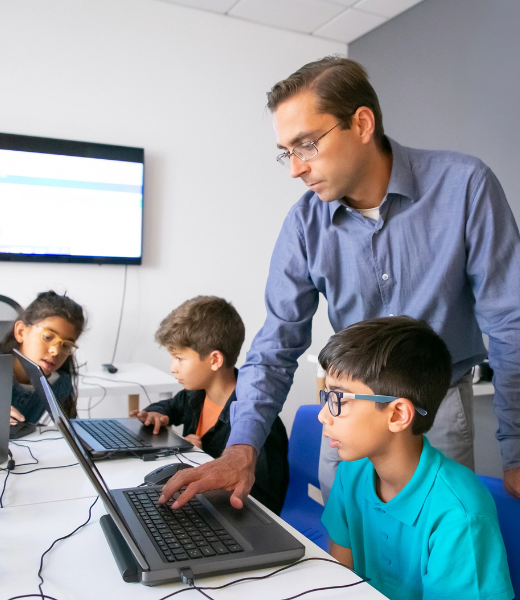
In-person training at our modern centre
- Face-to-face mentoring and direct doubt clearing
- Hands-on computer lab access during class hours
- Structured schedule builds daily discipline
- In-person networking and batch connections
- Printed materials and classroom resources
- Best for local students who prefer classroom structure
Future Classes in Our Basic Computer Skills
Saturday Batch – 15th July 2025
Saturday 10:00 AM – 1:00 PM (IST)
Saturday Batch – 15th August 2025
Saturday 10:00 AM – 1:00 PM (IST)
- Easy EMI: Pay in 12 Interest-Free EMI.
- 100% Money-Back Guarantee: If You Do Not Like Our Course, You Can Claim A 100% Money-Back After Your First Session.
- Certification Fee: Cost includes Google, HubSpot, and Digital Computer Academy exam and certification fees.
- Group Discount: Get 10% off when you register three or more people.
- Job Key Metrics: Please review our consent and terms for the placement guarantee training.
Admission Eligibility Process
Registration
Submit Your Documents
Select Your Batch
Pay Your Fee
Take the First Step Toward Success with Digital Computer Academy
Join Delhi’s No. 1 Computer Institute
100% Guaranteed WFH/Freelance
50+ Hiring Partners
Learn Basic Computer Skills Is Offered by Digital Computer Academy for These Reasons
1. Support
Digital Computer Academy is completely focused on people in a world full of robots. You will receive unmatched care and assistance from the institute throughout your trip. Every participant receives individualized attention from the institute because of its small batch size.
2. Group Mentors
Mentors come in the form of knowledgeable trainers with over 10+ years of expertise. The mentors are your buddy and guide, with a friendly demeanor, and they are passionate about everything digital.
3. Course and Certifications
The course syllabus covers all topics in digital marketing in detail. Digital Computer Academy offers a master certification and also prepares you for globally recognized certifications from Google, Facebook, and HubSpot.
4. Virtual Delivery
Our online digital marketing course offers an engaging and immersive virtual learning experience that’s convenient and hassle-free. You’ll learn through case studies, assignments, and group discussions, making it more interactive than a traditional classroom. Plus, you can study anytime, anywhere.
5. Pay Once, Enjoy Lifetime Access
For a single, affordable price, participants get lifetime access to our learning platform. This platform is continuously updated and includes all course materials, such as presentations, training documents, and class recordings.
6. Fringe Benefits
To help you choose the best career path, Digital Computer Academy provides career counseling. Beyond just counseling, they also help you prepare for interviews, create infographic resumes, and find job placements. Furthermore, the academy offers support even after your training is complete.
What Kind of Jobs Are Available After a Basic Computer Course?
Data Entry Operator:
₹1.5 LPA – ₹3 LPA
Enter and manage data in Excel or software systems
Computer Operator:
₹1.8 LPA – ₹3.5 LPA
Handle basic computer work and office tasks
Office Assistant:
₹2 LPA – ₹3.5 LPA
Manage files, emails, and documentation
Back Office Executive:
₹2 LPA – ₹4 LPA
Handle backend work, data processing, and reports
Customer Support Executive:
₹2 LPA – ₹4 LPA
Handle customer queries and maintain records
Billing Executive:
₹2 LPA – ₹3.5 LPA
Create bills and manage records using computer software
🚀 Start Your Online or Offline Learning Journey Today!
Learn from industry experts through interactive sessions, real projects, and flexible learning options designed to fit your schedule.
Both Online and Offline Classes available to suit your schedule.
Flexible timings with weekday & weekend batches.
Hands-on practice with real industry projects.
Get recorded sessions and study material for lifetime access.
Book your Free Demo Class or chat with us directly on WhatsApp!
What Is a Basic Computer Course and Why Does It Matter in 2026
A basic computer course is a structured learning program designed to help individuals gain foundational digital skills from operating a system to navigating the internet and using productivity tools. Whether you are a student, a job seeker, or a working professional, building solid computer basics is the first step toward thriving in today’s digital economy.
Read More
Who Should Enroll in a Basic Computer Course?
This type of course is designed for anyone starting from zero digital experience. It is especially valuable for:
School and college students looking to strengthen their academic and career readiness
Job seekers who need to demonstrate practical basic computer skills to employers
Freelancers entering fields like data entry, virtual assistance, or content writing
Working professionals upgrading from manual to digital workflows
Homemakers and senior citizens building confidence with modern technology
Core Topics Covered in a Computer Basics Course
A well-structured program covering computer basics for beginners typically includes the following modules:
Computer fundamentals — hardware components, input/output devices, storage, and system types
Operating systems — working with Windows or macOS, file management, and system navigation
Typing skills — keyboard shortcuts, touch typing techniques, and speed-building exercises
Microsoft Office essentials — Word, Excel, and PowerPoint for everyday tasks
Internet and email — browsing safely, using search engines, and managing professional communication
Basic cybersecurity awareness—recognizing phishing, setting passwords, and protecting personal data
Key Benefits of Learning Basic Computer Knowledge
Investing time in learning basic computer knowledge delivers both immediate and long-term advantages
For students
Stronger academic performance with digital tools and research skills
For job seekers
A certified credential that satisfies entry-level employer requirements
For freelancers
Ability to handle remote work platforms, spreadsheets, and client communication
For daily life
Confidence in managing finances, online services, and digital communication
What Makes a Good Basic Computer Course?
Not all programs are created equal. When evaluating a basic computer course, look for these quality indicators
Practical, hands-on sessions rather than purely theoretical content
Certified curriculum aligned with industry or government standards
Experienced instructors with real-world teaching backgrounds
Flexible learning formats offline, online, or hybrid modes
Post-completion support such as job placement assistance or practice projects
From Computer Basics to Career Readiness
Completing a computer basics for beginners program is not just about learning to use a computer—it is about building confidence, efficiency, and employabilty. The skills gained form a foundation for more advanced learning paths, including graphic design courses, programming, digital marketing courses, and data analysis.
In an era where digital fluency is expected across virtually every industry, acquiring basic computer skills is no longer optional—it is essential. The right course equips learners with the tools to adapt, grow, and succeed in a technology-driven world.
FAQs On Basic Computer Knowledge
Got questions? We’ve got answers! Here are some of the most common things people ask us.
Yes, MS Office is a key part of the curriculum. You will learn how to create documents in Word, manage data in Excel, and prepare presentations in PowerPoint.
The average Digital Marketing Salary after our course:
Freshers Salary: Minimum CTC 4,5 LAC
Experience: Minimum 20% Hike on current CTC.
Yes, upon successful completion, you will receive a certificate that can help improve your job opportunities and add value to your resume.
After completing a basic computer course, you can apply for entry-level jobs such as data entry operator, office assistant, or computer operator. It also helps in daily personal and professional tasks.
These classes offer structured learning, expert guidance, and practical exposure. Students benefit from a supportive environment and updated course content that meets current industry needs.
You can enroll by visiting the official course page:
https://www.digitalcomputeracademy.in/courses/video-editor-course/
From there, you can get complete details, contact support, and register easily.
A basic computer course covers essential computer skills such as operating systems, typing, file management, internet usage, email handling, and introduction to MS Office tools like Word, Excel, and PowerPoint. It builds a strong foundation for beginners.
This course is ideal for students, job seekers, homemakers, and professionals who want to improve their computer knowledge. It is especially helpful for beginners with little or no prior experience.
The duration usually ranges from 2 to 4 months, depending on the learning pace and course structure. Flexible batches are often available for convenience.
Yes, the course includes hands-on training with practical exercises. Students get to work directly on computers, ensuring they understand real-world applications and gain confidence.
Yes, the course is designed specifically for beginners. It starts with the basics and gradually progresses to more advanced topics, making it easy to follow.